Microsoft 365 waste is quiet. Nobody notices it, nobody owns it, and it bills you every single month. A seat bought for a starter who never started. A leaver whose account was disabled but never unlicensed. A full E3 suite assigned to a shared mailbox that only ever receives invoices. None of it shows up as a problem, because the invoice arrives, the amount looks familiar and everyone moves on.
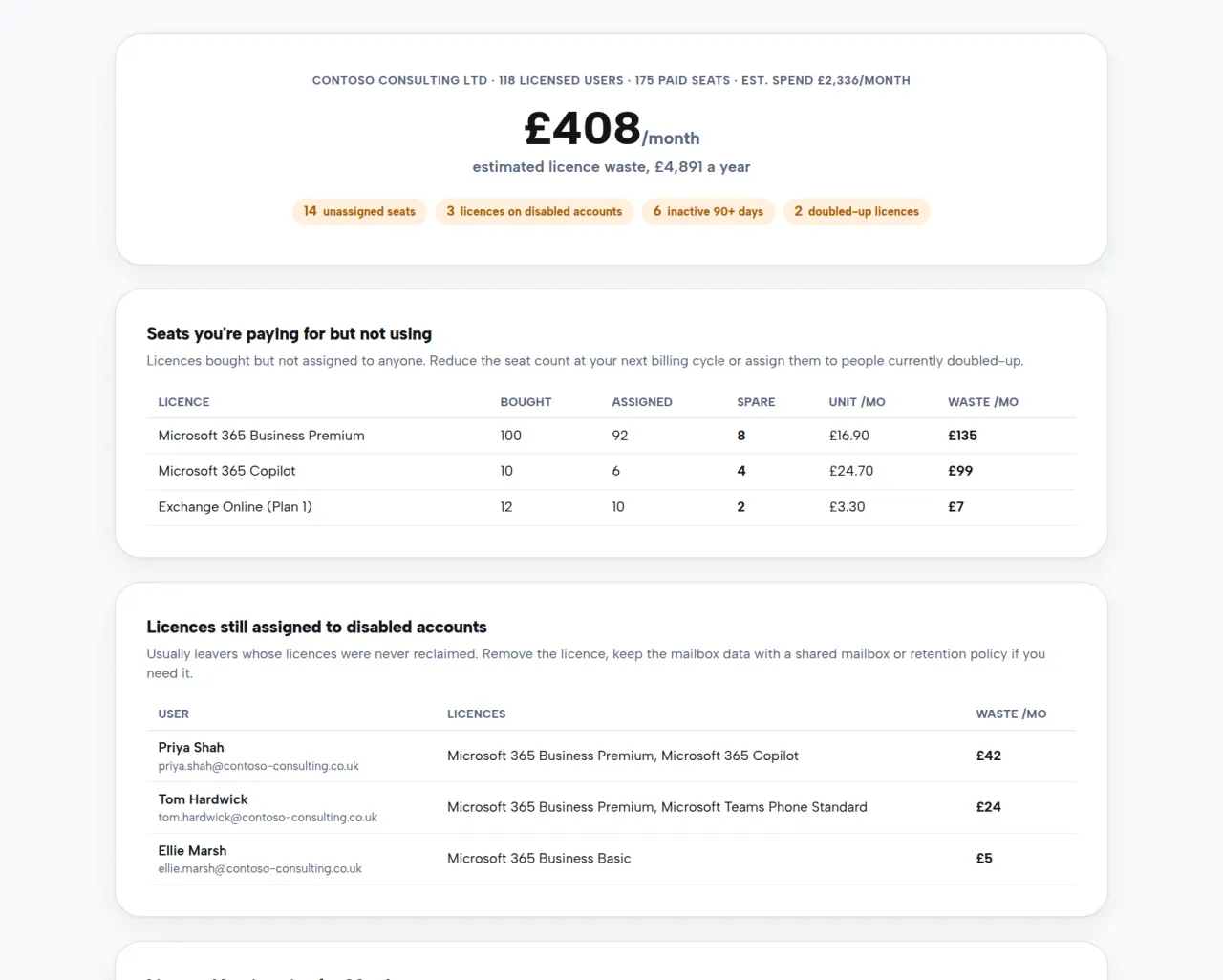
We built a free tool to make that waste visible. Our Microsoft 365 licence review signs you in with your own Microsoft admin account, runs a read-only scan of your tenant, and shows you what you’re paying for but not using, in pounds, in about a minute.
Where the waste hides
After years of running licence optimisation for clients, the same five patterns come up in almost every tenant:
- Unassigned seats. Licences you bought that aren’t assigned to anyone at all. You’re paying for empty chairs.
- Leavers still licensed. The account gets disabled when someone leaves, but the licence stays attached. Disabled users can’t use Word, yet the subscription keeps billing.
- Inactive users. People with paid licences who haven’t signed in or touched email, Teams or SharePoint in 90 days or more. Some are on long-term leave. Many left months ago through a side door.
- Doubled-up plans. A user holding Business Premium and a separate Exchange Online plan, for example. One already includes the other, so the smaller licence is pure duplicate spend.
- Oversized suites. Full E3 or Business Premium assigned to people who only ever use email. A mailbox-level plan does the same job for a fraction of the price.
Each one looks small on its own. Add them up across a 50 or 100 person business and the annual figure gets uncomfortable, especially after Microsoft’s July 2026 price increases made every wasted seat more expensive. We’ve written before about how Microsoft licensing changes creep up on you.
How the free review works
You sign in with your Microsoft 365 admin account on the licence review page. Microsoft asks you to approve a set of read-only permissions, then the tool reads four things: your subscriptions and seat counts, who holds which licences, whether accounts are enabled, and Microsoft’s own 90-day usage reports.
A minute later you get a summary: estimated monthly and annual waste, plus counts for each of the categories above. The full breakdown names the licences and the users involved, so your admin can act on it the same day.
A few things worth knowing before you run it:
- It’s read-only. The tool can’t change anything in your tenant, and you never share your password with us. Sign-in happens on Microsoft’s own pages, and an admin can revoke the access afterwards in Entra under Enterprise applications.
- Nothing is stored. The scan is processed on the fly and discarded. Your contact details only reach us if you choose to share them at the end.
- The figures are honest estimates. We use UK list prices, exclude anything we can’t price, and count each user’s waste only once. Some flagged licences will turn out to be intentional, which is exactly what a proper review confirms before anything changes.
What to do with the findings
Plenty of the fixes are yours to make the same afternoon: remove licences from disabled accounts, drop unassigned seats at your next renewal, and reassign the doubled-up plans. If you’d rather someone did the whole job properly, that’s our Microsoft licensing service. We validate every finding, make the changes, and keep the estate lean with monthly optimisation reports, all at standard Microsoft pricing. Most clients see savings of 15 to 30% in the first quarter.
Licensing is also a good first pull on a bigger thread. Tenants that carry licence waste usually carry configuration drift too, which is where our modern workplace team earns its keep.
Try it now
Run the free licence review. It takes about a minute, the summary costs nothing, and the worst case is finding out your tenant is already tight. If you’d like a second pair of eyes on the results, get in touch and we’ll talk them through with you.